C# project woes

Microsoft Dynamics (Axapta) 2012 R1.

So, we have an interface includes a C# project, and for some reason it’s periodically giving us errors.  One theory I have is that this is occurring when I import code or copy a database but don’t have the I have the Microsoft Dynamics AX Configuration Utility set to the environment that the data is being copied into.  I may be wrong.  But even without the root cause, I can describe the steps I’m taking to correct them.

Here are some of the errors:
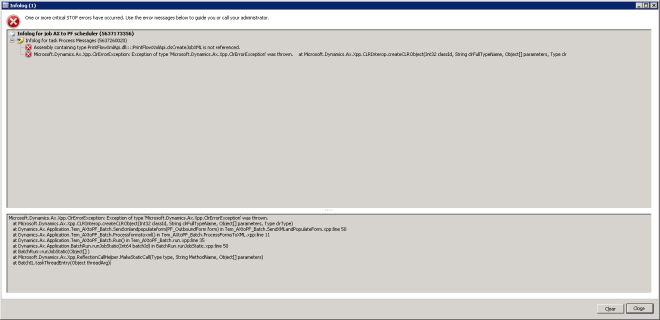
cpp1

“Assembly containing type <C# class name> is not referenced

cpp3

CIL generation: Severe Warning: .NET type <C# class> is not found during IL generation.  <AX class that references C# class> will throw an exception at run time.
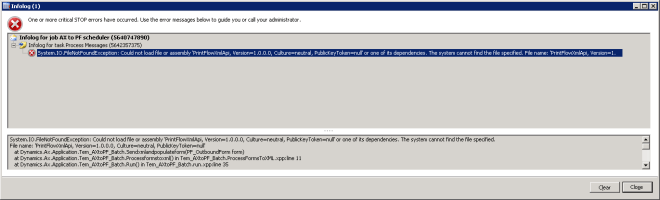
cpp4

System.IO.FileNotFoundException:  Could not load file or assembly <c# class> … or one of its dependencies.  The system cannot find the file specified.


Basically these errors mean that your AX code can no longer recognize your C# code.  Depending on which errors you have, you may not need to do all of the things on this list:

  1. Ensure that you’re running Axapta as an administrator.
  2. Go into the Microsoft Dynamics AX Configuration Utility and ensure that you have it set to the correct environment.  This utility is on the Terminal Server
  3. Go into the Microsoft Dynamics AX Server configuration Utility and ensure that you have ‘Enable the hot-swapping of assemblies for each development session’ checkbox checked.  This utility is on the environment server (naxaospp for dev).
  4. Edit the C# project (this will bring up visual studio).
  5. Rebuild the C# project.
  6. Deploy the C# project.
  7. In Axapta, find the AX class that is accessing the C# class.  Right click on it and select Compile forward.
  8. Generate incremental.
  9. If you get an error while generating incremental, then restart your environment service, then try steps 7 & 8 again.


Unable to add the table field to the query source

Microsoft Dynamics (Axapta) 2012 R1.

So, I made some modifications to a report.  It’s a SSRS Report with a Dynamics AX model Project.  Everything works fine in Dev, but when I check my code into live I find that I’ve broken the report:

MissingField

Upon further investigation, as part of my changes I added a new field to the tmp class (Tem_ProdReportTmp).  The report displays this new field.  However, when I moved to live, the Live environment can’t make heads or tails of this field.

The solution is to restart the reporting service for live.  This is not the same as restarting the Live environment.  Our reporting service is running on the SQL server and is called ‘SQL Server Reporting Services (MSSQLServer).

A table, Extended Data Type, Base Enum, or class called already exists. Import of Table aborted.

Microsoft Dynamics (Axapta) 2012 R1.

Feb9ErrorMsg

So, on Monday I was trying to import a project into my Live environment and I get this error.  After some research, I believe I know what caused the error, and how to fix it, so I’m going to share those with you.

First off, the object that was causing the error was a new table that I’d created called Tem_SlitOrderSizes.  I tried importing just that table, didn’t work.  I tried exporting it again in case the file was corrupted – no dice.

I’m 90% certain I know what caused this.  You see, at my company I have three environments:  Dev, Test, and Live.  Usually I make our development in Dev and then import the changes into Live.  Ideally we would use Test to… test them.  But we don’t have a testing team as I am the sole developer here.  So Test is generally unused.  However, for this particular project I elected to develop it in Test, as there was a lot of stuff I was doing in Dev at the time and I wanted a degree of separation between my Dev projects and my current project.  But because Test was old, it’s table identifiers are out of date.  Basically, the new table I created had an identifier that was already in use for another table in Live, because I’d made some other table in Dev and imported it into Live at some point.

Thankfully, the solution was simple – reset the cache!  In your live development workspace, go to Tools -> Caches and refresh all three of the options there.  Then you can import the class.  Although in the future, proper environment usage would be the way to go.